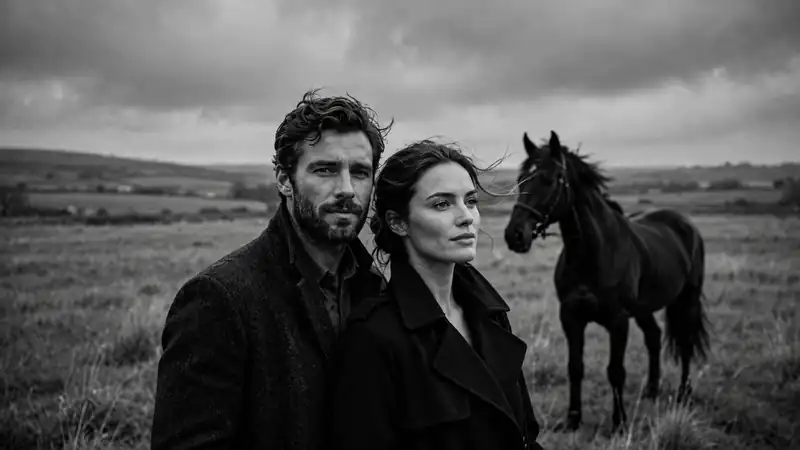
An aura farm prompt is a text instruction you paste into an AI tool like Google Gemini or ChatGPT, together with your photo, to turn it into a high-contrast, cinematic, black and white editorial portrait. The most popular version shows a calm, confident person sitting beside a black horse in an open landscape, or standing next to a dark shadow figure.
In this guide you get 30+ copy and paste aura farm prompt ideas for horse portraits, girls, boys, couples and dark shadow styles. You also get step-by-step instructions for Gemini and ChatGPT, tips for better results, and answers to the most common questions.
Want to try one right now? Upload a clear photo of yourself to Gemini or ChatGPT and paste this prompt:
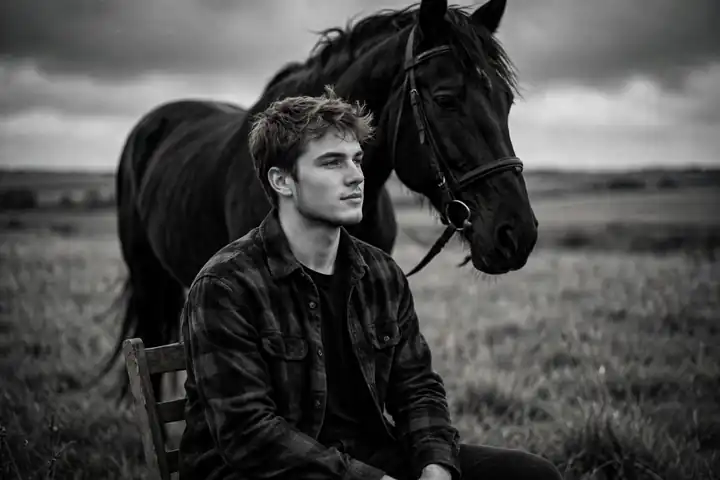
Transform my photo into a cinematic black and white editorial portrait. Keep my face exactly the same. I am sitting calmly on a wooden chair in an open field beside a tall black horse, moody overcast sky, high contrast, fine film grain, 85mm lens, shallow depth of field, quiet confident expression.
What’s in This Guide
- What is an aura farm prompt?
- How to use an aura farm prompt in Gemini and ChatGPT
- Aura farm prompts with a black and white horse (1-10)
- Aura farming prompts for girls (11-16)
- Aura farming prompts for boys (17-22)
- Shadow entity and trending variations (23-30)
- Gemini vs ChatGPT
- Tips for better results
- Create your own aura farm prompt
- FAQ
What Is an Aura Farm Prompt?
“Aura farming” is internet slang for doing something in a way that builds a cool, effortless, magnetic presence. An aura farm prompt applies that idea to photos: it tells the AI to restyle your picture so you look calm, powerful and a little mysterious.
The look is easy to recognize:
- Black and white, high contrast, often with visible film grain
- A calm, confident subject, usually seated or standing still
- A black or white horse in an open field, or a dark shadow figure behind the subject
- A moody sky, soft fog or a plain studio backdrop
- Editorial, fine-art composition, like a magazine portrait
Why the aura farm prompt trend went viral
- Low effort, high payoff. One photo and one pasted prompt gives a result that looks professionally shot.
- Works for everyone. Any selfie can be used, so people post their own version instead of just sharing someone else’s.
- Easy to remix. People swap the horse for a wolf, a car or a shadow entity, which keeps the trend fresh.
What you need
- A clear, well-lit photo of your face (front-facing works best)
- Access to Gemini, ChatGPT or any AI image tool that accepts photo uploads
- A prompt from this page
How to Use an Aura Farm Prompt in Gemini and ChatGPT
The process is the same in both tools and takes about a minute.
- Pick a clear photo. Face visible, good light, no sunglasses or heavy filters. Close-up or waist-up shots work best.
- Open Gemini or ChatGPT and start a new chat.
- Upload your photo with the attach button.
- Paste a prompt from the sections below. Start with “Keep my face exactly the same” so the AI does not change your features.
- Generate and review. If the face drifts, add “preserve my facial features and identity” and try again.
- Refine. Ask for small changes in a follow-up, such as “make the sky darker” or “add more film grain”, instead of rewriting the whole prompt.
- Download and post. Save the image and share it on Instagram, Pinterest or short video.
Want a custom prompt without writing it by hand? Use the free AuraPrompt generator. Describe your idea, pick a style and it writes a ready-to-paste prompt for you. You get 5 free prompts a day with no login.
Copy and Paste Aura Farm Prompts (Black and White Horse)
These are the classic aura farming prompts. Upload your photo first, then paste one prompt. Every aura farm prompt below works in Gemini and ChatGPT.
1. The Classic Seated Portrait
Transform my photo into a cinematic black and white portrait. Keep my face exactly the same. I am sitting on a simple wooden chair in an open field, a tall black horse stands close behind me. Overcast sky, high contrast, fine film grain, 85mm lens, calm and confident expression.
2. Horse Beside Me, Standing
Create a black and white editorial portrait from my photo, keeping my face and features unchanged. I stand tall next to a black horse, one hand resting on its neck. Wide empty landscape, low horizon, dramatic clouds, deep shadows, magazine quality.
3. Face to Face with the Horse
Restyle my photo as a close black and white portrait. Keep my face the same. My forehead is almost touching the forehead of a black horse, eyes closed, quiet and intimate moment. Soft side lighting, shallow depth of field, fine grain.
4. Foggy Morning Field
Turn my photo into a moody black and white scene. Keep my face exactly as it is. I walk slowly through a foggy field leading a dark horse by the rope. Low mist, soft backlight, cinematic framing, muted contrast, film look.
5. The Rule of Thirds Portrait
Make a black and white fine-art portrait from my photo with my face unchanged. Place me on the left third of the frame, seated on the ground, with a black horse standing on the right third. Large empty space, strong negative space, high contrast, editorial style.
6. White Horse, Dark Outfit
Transform my photo into a black and white portrait. Keep my face the same. I wear a dark long coat and stand beside a white horse against a dark stormy sky. The horse glows against the shadows. Dramatic contrast, cinematic lighting, sharp detail.
7. Low Angle Power Shot
Create a low-angle black and white portrait using my photo, face unchanged. I stand confidently with a black horse rearing slightly behind me. Heavy clouds, wind in the mane, strong contrast, heroic and calm, 35mm film look.
8. Studio Backdrop Version
Restyle my photo as a studio black and white portrait. Keep my face exactly the same. I sit on a stool in front of a plain dark backdrop with a black horse beside me. Single soft spotlight, rich shadows, clean fine-art look.
9. Sunset Silhouette Edge
Turn my photo into a high-contrast black and white image. Keep my face and features unchanged. Me and a black horse in profile against a bright low sun, edges lit by rim light, long shadows on dry ground, cinematic and quiet.
10. Vintage Film Portrait
Make my photo look like an old black and white film photograph. Keep my face the same. I sit relaxed beside a dark horse on a farm road, slightly faded blacks, visible grain, soft vignette, timeless documentary style.
Aura Farming Prompts for Girls
These aura farming prompts for girls keep the same black and white mood but add softer styling. Use your own photo and keep the “face unchanged” line.

11. Elegant Portrait with a Horse
Transform my photo into a black and white fashion editorial portrait. Keep my face exactly the same. I wear a long flowing dress and sit gracefully beside a black horse in an open field. Soft wind in my hair, cloudy sky, high contrast, film grain.
12. Strong and Quiet
Create a cinematic black and white portrait from my photo with my face unchanged. I stand in a dark long coat, arms relaxed, a black horse behind me. Calm, powerful expression, dramatic sky, shallow depth of field.
13. Veil and Fog
Restyle my photo as a moody black and white image. Keep my face the same. I wear a thin dark veil, standing in soft fog next to a white horse. Dreamy, mysterious, low contrast mist with deep blacks, fine-art style.
14. Window Light Portrait
Make my photo a black and white studio portrait. Keep my face exactly as is. I sit by a large window with soft side light, a dark horse silhouette visible behind me. Gentle shadows, elegant pose, editorial magazine look.
15. Windy Hilltop
Turn my photo into a black and white wide shot. Keep my face unchanged. I stand on a windy hilltop with my hair and scarf blowing, a black horse beside me, wide dramatic clouds, cinematic and calm.
16. Close-Up Beauty Shot
Create a black and white close-up beauty portrait from my photo. Keep my face and features unchanged. Soft light, natural skin texture, a horse's dark eye and mane blurred in the background, high contrast, 85mm lens.
Aura Farming Prompts for Boys
The aura farming prompt versions for boys lean on darker tones, sharper contrast and a heavier, more serious mood.
17. Dark Coat, Black Horse
Transform my photo into a cinematic black and white portrait. Keep my face exactly the same. I wear a long dark coat and sit on a rock in an empty field, a black horse standing right behind me. Heavy clouds, deep contrast, calm cold stare.
18. Back Turned, Facing the Horizon
Create a black and white wide shot using my photo. I stand with my back partly turned, looking at a far horizon, a black horse beside me. Keep my face visible in a three-quarter view and unchanged. Strong sky, long shadows, cinematic.
19. Hand on the Horse
Restyle my photo as a black and white editorial portrait. Keep my face unchanged. I look straight at the camera with one hand resting on a black horse's face. Plain dark background, hard side light, textured grain.
20. Street Style Aura
Turn my photo into a black and white street portrait. Keep my face exactly the same. I lean against an old wall in a dark jacket, a shadow figure of a horse on the wall behind me. High contrast, moody, 35mm film look.
21. Leader of the Pack
Make a dramatic black and white portrait from my photo with my face unchanged. I walk forward calmly while several dark horses follow behind me in soft focus. Dust in the air, low sun, cinematic and powerful.
22. Minimal Studio Portrait
Create a minimal black and white studio portrait from my photo. Keep my face exactly the same. I sit on a black stool, arms on knees, a horse partly visible at the edge of the frame. Clean background, high contrast, editorial look.
Dark Shadow Entity and Trending Aura Farm Prompt Variations
Not everyone wants a horse. The second big aura farm prompt style puts a dark, mysterious figure behind the subject. These prompts also cover couples and other creative twists.
23. Shadow Entity Behind Me
Transform my photo into a dark cinematic portrait. Keep my face exactly the same. A tall faceless shadow figure with faint glowing eyes stands behind me in thick fog. I stay calm and unbothered in the front. Black and white, high contrast, horror-film lighting.
24. Smoke Aura
Create a black and white portrait from my photo with my face unchanged. Dark smoke rises around my shoulders and forms a faint towering shape behind me. Dramatic backlight, deep blacks, fine grain, calm expression.
25. Wolf Instead of Horse
Restyle my photo as a black and white editorial image. Keep my face the same. A large black wolf sits calmly beside me in a snowy forest clearing. Soft fog, cold light, cinematic and quiet.
26. Couple Aura Portrait
Turn my photo into a black and white couple portrait. Keep both faces exactly the same. We stand close in an open field with a black horse behind us, overcast sky, soft wind, romantic and cinematic, high contrast.
27. Car and Night Street
Make a black and white night portrait from my photo with my face unchanged. I lean on a classic black car on an empty wet street, streetlights glowing, light mist, cinematic and moody, 50mm lens.
28. Rooftop City Aura
Create a black and white portrait from my photo. Keep my face exactly the same. I sit on a rooftop edge with a huge city skyline behind me and heavy clouds above, a calm confident posture, wide cinematic frame, deep contrast.
29. Birds in the Sky
Restyle my photo as a black and white fine-art portrait with my face unchanged. I stand in an open field while hundreds of black birds fly across a pale sky behind me. Quiet, powerful mood, high contrast, film grain.
30. Royal Throne Aura
Turn my photo into a black and white portrait. Keep my face exactly the same. I sit on a large stone throne in an empty ruined hall, a black horse standing quietly in the doorway behind me. Rays of light, dust in the air, epic and calm.
Bonus: color version of any aura farm prompt
If you want to keep color, change the first line of any prompt above to:
Keep the image in rich, muted color with a dark teal and warm amber palette instead of black and white.
Gemini vs ChatGPT for Aura Farm Prompts
Both tools can handle every aura farm prompt on this page. Results change with model updates and your plan, so test the same prompt in both and keep the better one.
| Gemini | ChatGPT | |
|---|---|---|
| Photo upload | Yes, attach in chat | Yes, attach in chat |
| Best for | Quick tries and fast iteration | Detailed follow-up edits in the same chat |
| Prompt style | Short, clear scene description | Short or long, responds well to step-by-step changes |
| Free use | Free tier available, limits vary | Free tier available, image limits vary |
Tips for Gemini
- Start with one clear sentence about the final look, then add details.
- If it refuses or changes your face, re-upload the photo and repeat “keep my face exactly the same”.
- Ask for “black and white, high contrast” explicitly, or it may keep some color.
Tips for ChatGPT
- Use follow-ups to fix details, such as “same image but darker sky”.
- If the result looks too edited, ask for “natural skin texture, no smoothing”.
- If you hit a free image limit, wait for it to reset or try the same prompt in Gemini.
Tips for Better Aura Farm Prompt Results
- Use a sharp, front-facing photo. Blurry or tilted faces are the main reason the AI changes your features.
- Always lock the face. Begin with “Keep my face exactly the same” and repeat “preserve my facial features” if the result drifts.
- Name the lens and light. Words like “85mm lens”, “shallow depth of field”, “hard side light” and “overcast sky” push the result toward a real photo look.
- Add grain. “Fine film grain” removes the plastic, over-smooth AI feel.
- Keep the scene simple. One person, one animal, one landscape. Crowded prompts create messy images.
- Change one thing at a time. If you like the result but not the sky, ask only for a new sky.
- Generate several versions. Run the same prompt 3 or 4 times and pick the best.
Common mistakes to avoid
- Group photos as input. The AI may mix up faces. Crop to one person.
- Heavy filters on the original. Beauty filters and sunglasses confuse the face match.
- Forgetting “black and white”. Without it you often get a color image.
- Overlong prompts. More than 4 or 5 details usually lowers quality instead of raising it.
Create Your Own Aura Farm Prompt (Free Generator)
The prompts above cover the most popular looks. If you want something specific, such as your own animal, outfit, location or camera style, the AuraPrompt generator builds the prompt for you.
- Describe your idea in one sentence.
- Pick a style, camera angle, camera movement and lighting.
- Click generate and copy the finished prompt.
- Paste it into Gemini or ChatGPT with your photo.
You get 5 free prompts per day, no login needed. Open the free prompt generator. New to prompt writing? Read our guide to the free AI prompt generator to learn how a good prompt is built.
Bonus: turn your aura portrait into a video
Once you have a portrait you like, you can animate it. A slow zoom, drifting fog or a moving mane makes the image feel alive. See our Veo 3 prompt examples for cinematic camera ideas, or compare the best AI video generators of 2026 to pick the right tool.
Aura Farm Prompt FAQ
What is an aura farm prompt?
An aura farm prompt is a text instruction used with AI tools like Gemini or ChatGPT to turn a photo into a cinematic, high-contrast black and white portrait, often with a horse or a dark shadow figure.
Is the aura farming prompt free to use?
The prompts on this page are free to copy. Gemini and ChatGPT both have free tiers, but daily image limits depend on the tool and your plan.
Which AI is best for aura farm prompts?
Gemini and ChatGPT both work. Try the same prompt in each and keep the better result, since quality changes as models update.
Why does the AI change my face?
Usually the photo is blurry, tilted, or has filters. Use a sharp front-facing photo and start the prompt with the line: Keep my face exactly the same.
Can I make an aura farm prompt for a girl, a boy or a couple?
Yes. Use the girl, boy and couple prompts above, or change the clothing and pose lines in any prompt.
Can I use a different animal instead of a horse?
Yes. Replace black horse with a wolf, a dog, a lion or birds. Keep the rest of the prompt the same.
How do I get a color version?
Remove black and white from the prompt and ask for a muted, cinematic color palette instead.
Can I make my own aura farm prompt?
Yes. Use the free AuraPrompt generator to build a custom prompt in seconds.
Conclusion
An aura farm prompt turns an ordinary photo into a moody, cinematic portrait in about a minute. Start with the classic seated horse prompt, lock your face with “keep my face exactly the same”, and change one detail at a time until you get the look you want. When you want something custom, build it with the AuraPrompt generator and share your result.